Stable Selenium Locators: CSS Selectors vs XPath
CSS or XPath is the wrong first question. What decides whether a locator survives the next release is what it is anchored to — and that is exactly the judgement the A4Q Selenium Tester Foundation exam asks you to make.
Ask five automation engineers whether to use CSS selectors or XPath and you will get five confident answers, usually built on a performance argument that stopped being true years ago. The question is worth less than it looks, because both end up asking the same browser to find the same node. What decides whether your suite still runs after the next release is not the language you wrote the locator in — it is what the locator is anchored to.
That is also the way the certification exam frames it, which is convenient: the habits that pass a code review are the habits that pass the paper.
What the A4Q syllabus actually asks of you
The A4Q Certified Selenium 4 Tester Foundation syllabus never asks you to declare a favourite. Its locator objectives climb a ladder: remember which strategies exist, apply XPath and CSS to a given fragment, and then two that are genuinely harder — read a DOM tree and choose the most appropriate locator, and look at an expression and say what is wrong with it. One objective is about nothing but applying best practices to make locator expressions more reliable.
So the exam-relevant skills are, in order:
recognising the eight locator strategies and what each one costs;
ranking several valid locators for the same element and defending the choice;
spotting a malformed expression without running it;
naming the practice that would have prevented a flaky locator.
If you need the exam mechanics rather than the locator detail, they are in our A4Q Selenium Tester certification guide.
Eight strategies, and an official order of preference
Selenium exposes eight: id, name, class name, tag name, link text, partial link text, css selector and xpath. The project's own guidance on locators is blunt about the order: an id is preferred when it is unique and consistently predictable, a well-written CSS selector comes next, and XPath is placed last on the grounds that its syntax is complicated and frequently hard to debug. Note the reason given — debuggability, not raw speed. Keep that distinction, because most blog comparisons lose it.
What each language can do that the other cannot
XPath only: visible text and upward traversal
Two capabilities have no CSS equivalent. The first is matching on text content: //button[normalize-space()='Apply'] works, and nothing in CSS does the same thing. The second is walking upwards and sideways through the tree with axes such as ancestor, parent and preceding-sibling — the classic case being a cell whose only identity is the row label next to it.
CSS: shorter, and :has() closed the old gap
The standard complaint that CSS cannot select a parent is out of date. form:has(input[data-testid='promo-input']) selects the form by what it contains, and because the browser evaluates the selector it works through By.cssSelector with no extra work in Selenium. It is supported across current Chrome, Edge, Firefox and Safari. What CSS still cannot do is read text, so the split is narrower than the older articles suggest: text and axes go to XPath, everything else reads better in CSS.
One element, five locators, five different fates
Here is the exercise the exam actually sets. Same button, five expressions that all pass today, and each one is a bet on a different part of the page staying still.
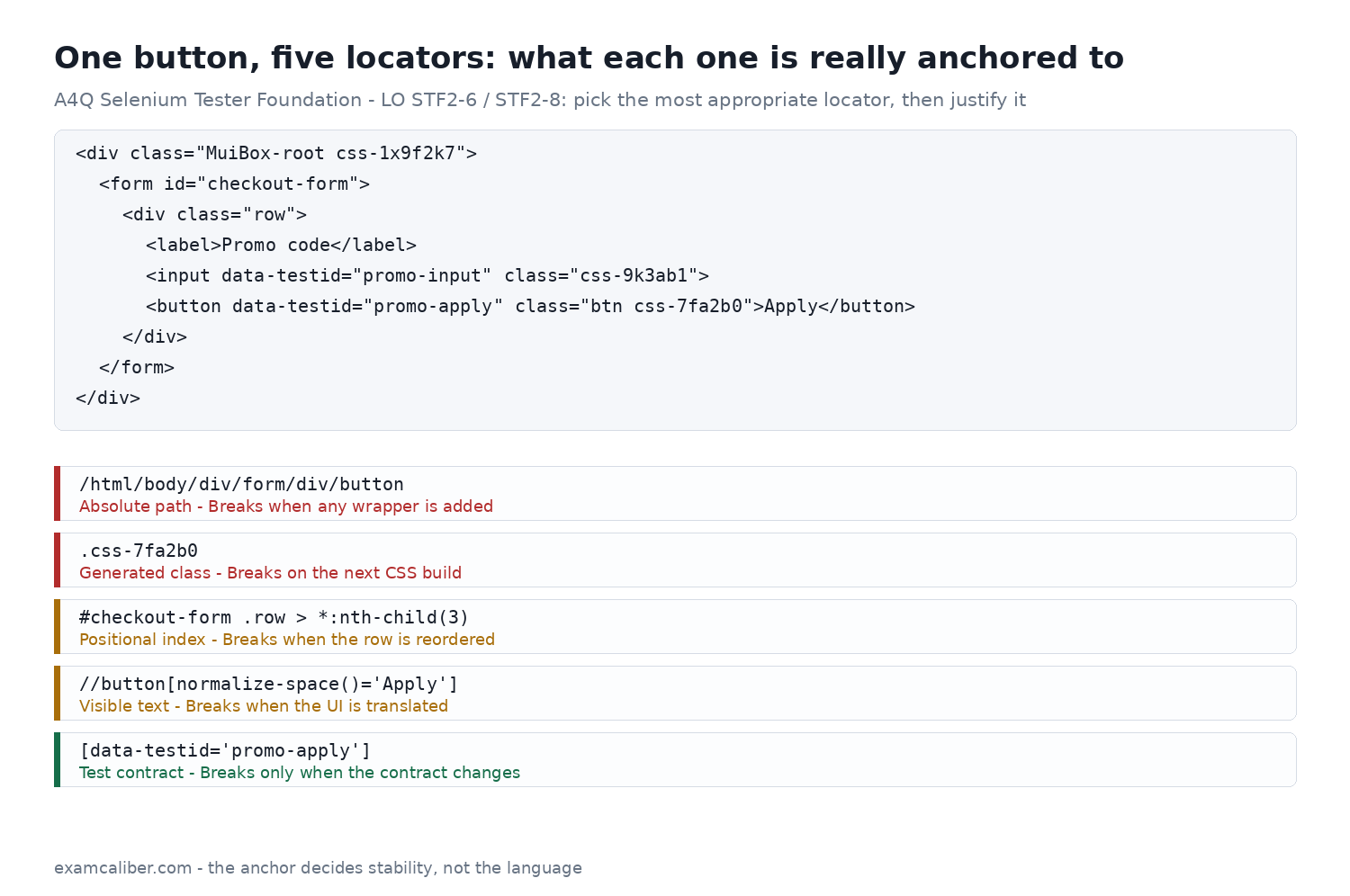
Read the list bottom-up and the rule states itself: the more the locator depends on how the page looks or where things sit, the shorter its life. Four anchors decay predictably:
Absolute paths. A path from the document root records the entire ancestry, so any new layout wrapper — a modal container, a theme provider, a flex row — invalidates it. This is the single largest source of locator decay, and most comparison articles still present it as a legitimate flavour of XPath.
Generated class names. Hashed classes from CSS-in-JS libraries, and long utility strings from frameworks such as Tailwind, are build artefacts. They change when styling changes, which is to say frequently and without anyone thinking about tests.
Positional indexes.
:nth-child(3)and[3]encode today's ordering. Adding a field, or showing an optional hint above the input, silently retargets the locator at the wrong element — the worst failure mode, because the test still passes while checking nothing.Long structural chains. Every
>or/step through a layout container is another dependency on markup nobody promised to keep. Start from the nearest genuinely stable ancestor instead.
Rules that make a locator survive
Anchor to an attribute that exists on purpose: a stable
id, aname, or a dedicateddata-testid.Treat those attributes as a contract with the developers rather than something you scavenge. A five-minute agreement that test hooks are not to be renamed removes more flakiness than any wait strategy.
Check that an id is generated deterministically before trusting it. Framework-generated ids such as
input-42look ideal and renumber on the next render.Keep one definition per element, in one place — the page object or a locator constant. Repeating an expression across five tests means fixing it five times.
Never reuse a styling hook. If a class exists to make something blue, it will change when the design changes.
Verify uniqueness. A locator that matches three nodes and happens to return the right one first is a defect waiting for a render-order change.
Pair the locator with an explicit wait for the state you need. A perfect expression still fails against an element that is present but not yet clickable.
Two Selenium 4 features the older comparisons miss
Relative locators let you describe an element by its position on screen: above, below, toLeftOf, toRightOf and near. They read beautifully in a test about a form layout, and they are evaluated against rendered geometry, so responsive breakpoints and font changes move them. Use them for readability, not for stability. There is no ancestor-style relative locator — a favourite distractor in mock questions.
The second is the shadow DOM. A shadow boundary stops CSS and XPath alike, so the common framing of this as an XPath weakness is simply wrong. Locate the host element, call getShadowRoot(), and continue searching from that root as a new search context.
Finding the malformed expression in thirty seconds
In the browser console, $x("//button[@data-testid='promo-apply']") evaluates XPath and $$("[data-testid='promo-apply']") evaluates CSS. Count the matches before you touch the test: zero means wrong, more than one means ambiguous, exactly one means you can move on. The malformations that recur in exam questions and in real reviews are the same handful:
a CSS-style
#idor.classpassed toBy.xpath, or an XPath predicate handed toBy.cssSelector;quote nesting: double quotes inside a double-quoted string, instead of single inside double;
a leading
/where a descendant search was meant, so the expression only matches a direct child of the context node;an exact
@class='btn'comparison against an element that carries several classes — that predicate matches the whole attribute value, so it fails;contains(@class,'btn')or the CSS.btnis what was intended;an unclosed bracket or a missing predicate, which throws an invalid-selector error rather than returning nothing.
The speed argument is mostly folklore
Nearly every comparison you will read asserts that XPath is slow enough to matter. Measure it and the difference between resolving an XPath expression and a CSS selector in a current engine lands in fractions of a millisecond, while a single findElement call is a full round trip to the driver and your synchronisation costs milliseconds to seconds. If a suite is slow, the cause is waiting, setup and network, not the selector dialect. The honest reason to reach for CSS first is the one Selenium's own documentation gives: you will spend less time debugging it.
Practise it the way the exam asks
Reading about locators is not the skill being tested; judging between four plausible expressions under time pressure is. Our A4Q Selenium Tester practice tests include DOM-fragment questions of exactly that shape, with a rationale on every option explaining why it is right or wrong — start with mock exam 1, which covers locators, waits and the Selenium tool set.
Frequently asked
Not in any way that matters. In a modern browser engine the difference in resolving one expression is a fraction of a millisecond, while every findElement call is a WebDriver round trip and your explicit waits cost orders of magnitude more. Choose on readability and debuggability, not on speed.
No. Text matching is XPath-only — functions such as text(), contains() and normalize-space() have no CSS equivalent. If the only distinguishing feature of an element is the words a user sees, XPath is the right tool, with the caveat that the locator will break when the interface is translated.
An attribute that exists specifically so tests can find the element: an id that is unique and predictable, or a dedicated data-testid / data-qa attribute agreed with the developers. Styling hooks, generated class names and positions in the DOM are all side effects of how the page happens to be built today.
It asks you to read it. Expect HTML fragments where you pick the most appropriate locator, expressions where you identify what is malformed, and short Java or Python blocks where you predict the behaviour. The exam is 40 multiple-choice questions, 26 correct to pass, in 60 minutes.
No, and neither can a CSS selector — the shadow boundary stops both. In Selenium 4 you locate the host element, call getShadowRoot() and search from the shadow root as a new search context.
Part of the ExamCaliber editorial team. Every ExamCaliber question and rationale is written and reviewed by hand against the current syllabus — never scraped from exam dumps.